
Inspections remain the core metric utilized by al stakeholder in the industry. They represent data points showing compliance and possible violations during the road side investigation. As such we provide you a space to keep record and score.
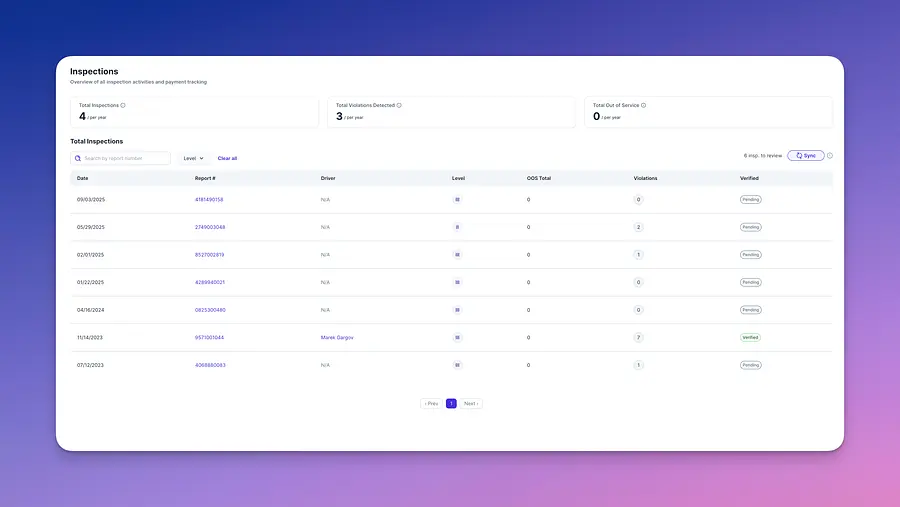
At a glance, you can see the total number of inspections, violations, and out-of-service (OOS) events that may indicate a need to pause and reevaluate. By default, all inspections are set to Pending, as each one should be reviewed individually by a safety manager to confirm the clarity and accuracy of the inspection report. This process helps the safety team make real-time decisions and, when appropriate, submit requests if a dispute is warranted.
The Inspection Details page is where you review and verify a single roadside inspection before it impacts your safety metrics.
At a glance, you can see the total number of inspections, violations, and out-of-service (OOS) events that may indicate a need to pause and reevaluate. By default, all inspections are set to Pending, as each one should be reviewed individually by a safety manager to confirm the clarity and accuracy of the inspection report. This process helps the safety team make real-time decisions and, when appropriate, submit requests if a dispute is warranted.
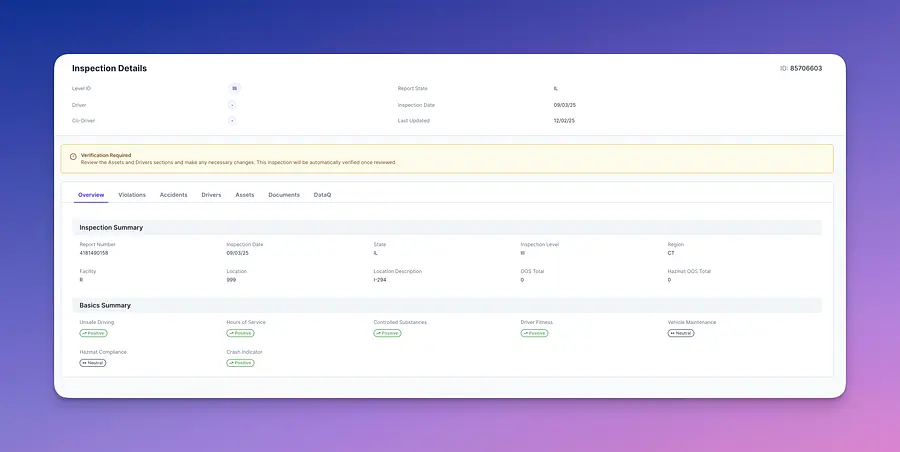
The Inspection Details page is where you review and verify a single roadside inspection before it impacts your safety metrics.
At the top of the page you’ll see key identifiers for the inspection, including:
-
Level ID, Driver, Co-Driver
-
Report State, Inspection Date, Last Updated
-
Inspection ID in the top-right corner
If the inspection still needs to be reviewed, a yellow “Verification Required” banner appears. This reminds you to verify the Drivers and Assets information. Once the review is complete, the inspection will be automatically marked as verified.
Below the banner you’ll find navigation tabs:
- Overview (default)
- Violations
- Accidents
- Drivers
- Assets
- Documents
-
DataQ
The Overview tab provides a high-level summary:
-
Inspection Summary
- Report number, inspection date, state, level, region
- Facility, location and description
- Total OOS and Hazmat OOS counts
-
Basics Summary
- Category indicators (Unsafe Driving, Hours of Service, Controlled Substances, Driver Fitness, Hazmat Compliance, Crash Indicator, Vehicle Maintenance)
- Each category is labeled with a status (for example, Positive or Neutral) so you can quickly see how the inspection impacts your BASICs.
- Category indicators (Unsafe Driving, Hours of Service, Controlled Substances, Driver Fitness, Hazmat Compliance, Crash Indicator, Vehicle Maintenance)
Use this page as your starting point for validating an inspection, then move into the other tabs when you need to drill into violations, drivers, assets, or supporting documents.